
Pivotal Skills AI & Microsoft 365 Copilot
You have Copilot licences; what remains is turning them into collective, business-driven and measured usage. We frame use cases by process, prepare your Microsoft 365 data, train your teams, build agents with Copilot Studio and steer adoption on facts.
The real Copilot challenge: from licence to usage
Copilot appears in Word, Excel, PowerPoint, Outlook and Teams in a few clicks. That is exactly what misleads: rollout is easy, regular usage is not. After a few weeks of curiosity, activity fades unless someone connects the tool to real work.
That is where we work: turning a technical rollout into daily, documented and transferable usage, inside the processes your teams already run.
- Licences assigned but usage limited to a few enthusiasts
- Invisible results, with no shared indicators
- Disappointing answers when source documents are outdated or misfiled
- Over-broad access rights that worry security and compliance
- No internal champions to spread good practice

Our role on a Copilot rollout
We stay in our craft: consulting, training, agent building, governance and measurement. You keep control of your Microsoft environment; we bring the method and the execution.
Framing by business process
We start from a real activity (finance, HR, procurement, sales, legal, support) and pinpoint the steps where Copilot saves time, instead of handing out individual tips.
Preparing the ground
SharePoint and OneDrive document hygiene, consistent Teams spaces, access rights and content sensitivity: answer quality depends first on data quality.
Training and AI literacy
Short sessions per business line, hands-on workshops inside Microsoft 365 apps, a library of validated prompts, and internal champions trained to keep it running.
Agents and automation
Copilot Studio agents and Power Platform automations for recurring needs, then industrialisation through our service centre.
Governance and measurement
Usage policy, compliance, risk review, plus adoption and value indicators tracked over time with Digital Skills Analyzer.
Prepare your Microsoft 365 data before expecting results
Copilot answers from what the user can already see in your tenant. A messy workspace produces wrong answers, and over-open sharing exposes sensitive content. We address that foundation upfront, with your IT and business teams.

Train by business line, not by feature
A generic demo does not change habits. We build paths per population, using your teams’ own documents and cases, so everyone leaves with two or three usages they can apply the next morning.
- Executive sessions: what Copilot changes, and what it does not
- Business workshops in Word, Excel, PowerPoint, Outlook and Teams
- A library of prompts validated per department
- Training for internal champions and community facilitation
- Short modules in French, English and Spanish
Building agents with Copilot Studio
Once a need becomes recurring, manual prompting is no longer enough: it needs an agent. We design Copilot Studio agents connected to your internal sources and, where useful, Power Platform automations to chain them into your processes.
AI governance in the Microsoft environment
Without a framework, agents multiply, duplicate and escape control. We set up simple governance that business teams understand and IT can enforce.
- Usage policy and confidentiality rules everyone can read
- Agent catalogue with owners and validated scope
- Request, approval and retirement process
- Periodic review of rights, sources and risks
- Adoption, value and compliance indicators
A collective, business and process approach
Most Copilot programmes stop at individual access: everyone explores alone, gains stay invisible and vanish when someone leaves. We equip whole teams around shared usage that is described and transferable.
Usage then becomes a company asset: it can be taught to a newcomer, measured across a department and compared from one quarter to the next.

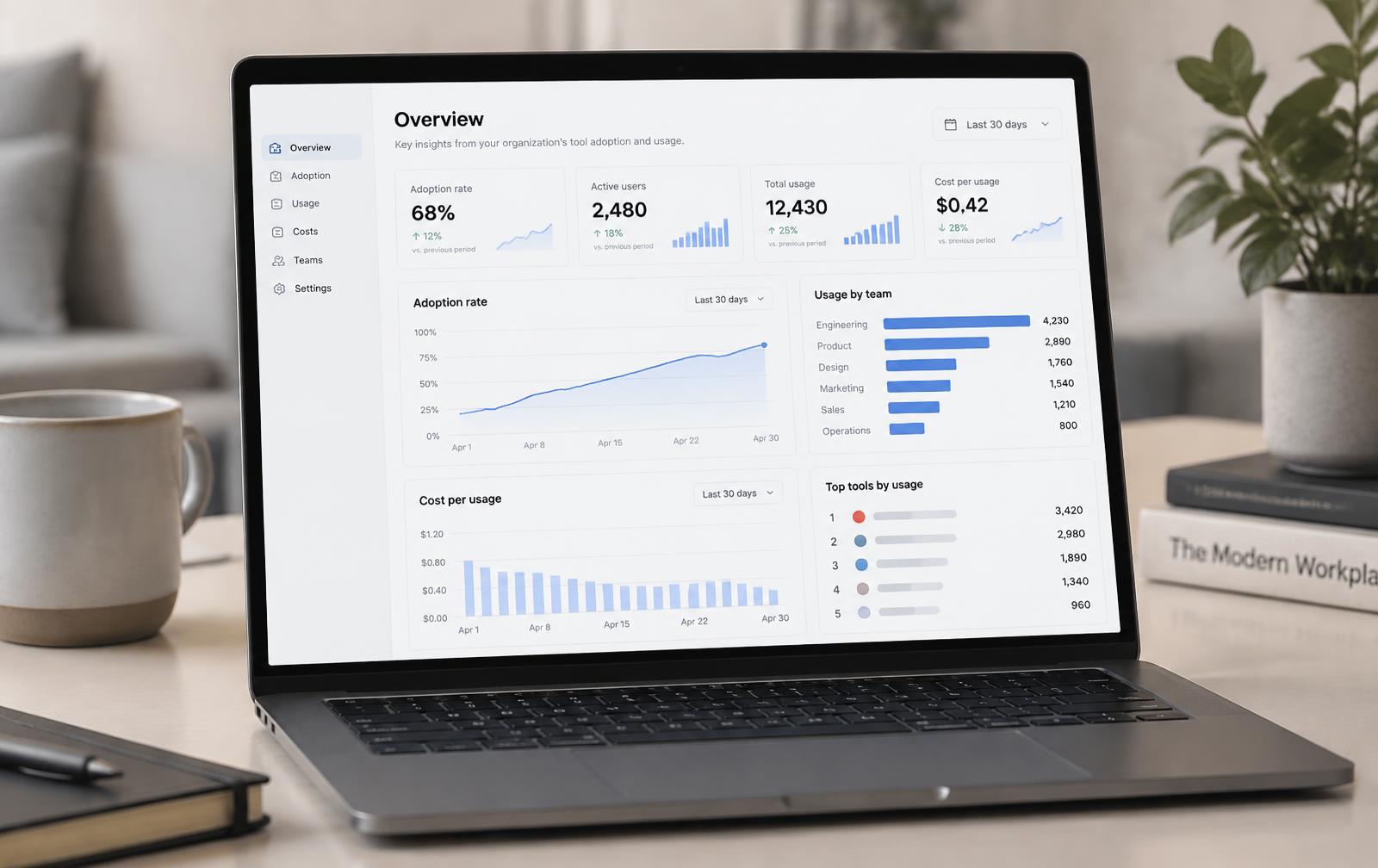
Digital Skills Analyzer: measuring usage, cost and adoption
You can only steer what you measure. Digital Skills Analyzer objectifies real usage of your digital tools and AI assistants, with no self-declared surveys.
On a Copilot programme it answers the questions that block decisions: who really uses what, at what cost, with what effect on time spent, and which populations to support first.
- Real usage by population, tool and assistant
- Licence cost matched against observed usage
- Time savings measured before and after rollout
- Change-management indicators tracked over time
Copilot or a dedicated agent platform?
Both approaches complement each other. We help you choose use case by use case, without dogma, based on your data, your users and your roadmap.
Copilot is the right choice when…
- Work already happens in Word, Excel, PowerPoint, Outlook and Teams
- Useful data lives in SharePoint, OneDrive and Teams
- You target day-to-day individual and collective productivity
- You want to stay within a single managed environment
An agent platform fits better when…
- Knowledge is scattered across business tools outside Microsoft
- You industrialise a large number of specialised agents
- You want to compare several models depending on the use case
- Some populations only need a handful of targeted agents
Frequently asked questions about Microsoft 365 Copilot in the enterprise
Prêt à transformer votre entreprise ?
Rejoignez les entreprises qui réussissent leur transformation IA avec Pivotal Skills AI
Contactez-nous